
Facebook Youtube
  • HOME
  • SUB CATEGORIES
    • AADHAAR
    • AGRICULTURE
    • BBPS
    • EDUCATION
    • ELECTION
    • ELECTRICITY
    • FINANCIAL
    • GOVERNMENT
    • HEALTH
    • INSURANCE
    • SKILLS
    • TELECOM
    • TRAVEL
    • UTILITIES
    • WATER
    • ESTORE
  • EDUCATION
    • Advanced English Learning
    • Basic Computer Course
    • Course On GST
    • Digital Financial Transactions And Awareness Prog.
    • Exam Registration – NIOS
    • Fee Payment – Haryana Industrial Training Institute
    • IIT-JEE Online Course
    • IIT/JEE/BITSAT/NEET Preparation
    • ITI Registration
    • Learn English – Gold Plan
    • Learn English – Silver Plan
    • NIELIT Courses
    • NIELIT Facilitation Centre
    • Online Admission – NIOS
    • Online Application Form – IGNOU
    • PMG DISHA
    • SLCM Admission
    • Sarkari Pariksha
    • Super 30 Books
    • Super 30 Sample Paper
    • Tally Certification With Flash Content
    • Tally Kaushal Praman Patra
    • Tally Self Learning Manual
    • Tally Software Registration
    • Tele-Law
    • Telecentre Entrepreneur Course
  • CSC Newsletter
  • Digipay
  • Downloads
Search
Saturday, March 7, 2026
Facebook Youtube
Sign in
Welcome! Log into your account
Forgot your password? Get help
Password recovery
Recover your password
A password will be e-mailed to you.
CSC
  • HOME
  • SUB CATEGORIES
    • AADHAAR
    • AGRICULTURE
    • BBPS
    • EDUCATION
    • ELECTION
    • ELECTRICITY
    • FINANCIAL
    • GOVERNMENT
    • HEALTH
    • INSURANCE
    • SKILLS
    • TELECOM
    • TRAVEL
    • UTILITIES
    • WATER
    • ESTORE
  • EDUCATION
    • Advanced English Learning
    • Basic Computer Course
    • Course On GST
    • Digital Financial Transactions And Awareness Prog.
    • Exam Registration – NIOS
    • Fee Payment – Haryana Industrial Training Institute
    • IIT-JEE Online Course
    • IIT/JEE/BITSAT/NEET Preparation
    • ITI Registration
    • Learn English – Gold Plan
    • Learn English – Silver Plan
    • NIELIT Courses
    • NIELIT Facilitation Centre
    • Online Admission – NIOS
    • Online Application Form – IGNOU
    • PMG DISHA
    • SLCM Admission
    • Sarkari Pariksha
    • Super 30 Books
    • Super 30 Sample Paper
    • Tally Certification With Flash Content
    • Tally Kaushal Praman Patra
    • Tally Self Learning Manual
    • Tally Software Registration
    • Tele-Law
    • Telecentre Entrepreneur Course
  • CSC Newsletter
  • Digipay
  • Downloads
  • CSC Newsletter

Outdoor Creative Service available in CSC- Last Date for Installation and First Scan of Second Creative

By
digitalindia
-
2990

 Standard Operating Procedure (SOP) for display of “Outdoor creative”

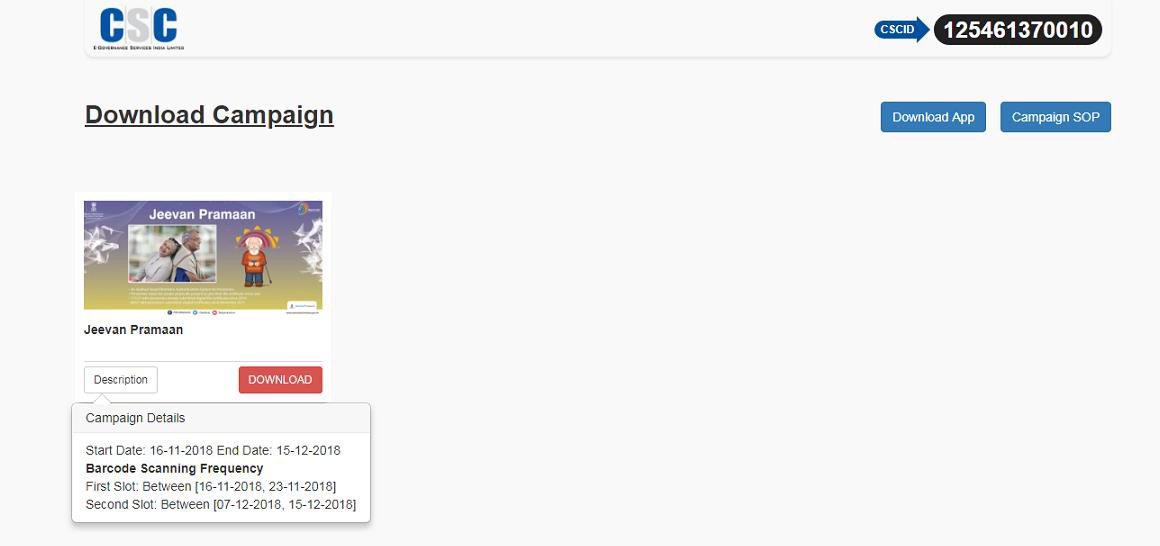
Step No. 1       VLE needs to  login through http://52.221.162.191/app/verifycampaign

Step No. 2     Selected VLE’s will be able to Download the creative and print the same on a Flex and display on a board (Printed Creative Minimum Size – 4 Ft x 2Ft) and fix it at a suitable space outside the CSC centre. VLE’s will also be able to check the campaign description by clicking on “Description “ button.

https://csc.gov.in/notification/image004.jpg

https://csc.gov.in/notification/image006.png

Step No. 3 The Downloaded file will generate a Barcode which will be Specific to the VLE and the Creative, The same design which is saved after download with the Barcode needs to be printed by the VLE on a flex/standee of size 4Feet by 2 feet.

Step No. 4 The VLE needs to also download a mobile app (Currently Android)  which is also  available on the Digital Seva on the Outdoor Creative page. The VLE needs to first download the Mobile App APK file in the computer and thentransfer the file to mobile and install it in the mobile phone.

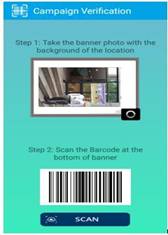
Step No. 5 After successful installation of the Mobile App on the VLE Android phone , Using the Mobile App the VLE will first take a picture of the creative which is put outside the centre.

https://csc.gov.in/notification/image008.jpg

Step No. 6       The VLE will afterwards scan the barcode which is displayed in the creative.

https://csc.gov.in/notification/image009.jpg

The Mobile app will capture the GIS coordinates (LATITUDE & LONGITUDE) of the Outdoor Creative location . This Activity needs to be performed two time as per mention frequency in campaign description.

Step No. 6       Monthly reimbursement will be given to only those VLEs who perform this activity successfully during the prescribe timeframe.

Step No. 7 CSC SPV shall pay an amount of Rs. 500 each per month till the time the Campaign is runningto all such VLEs who would have performed the above mention activity.

Step No. 8 The Central CSC team will examine the reports that are available on CSC Portal and if found correct will issue the sanction order to the Finance & Accounts Department for payment. The money can either be transferred to the e-wallet account or the bank account of the VLE concerned.

Points to remember

  • The VLE would download the creative, take a print out and affix the same on the board.
  • This creative will be placed outside the CSCcentre.
  • The VLE will fix a board measuring 4 feet X 2 feet at his / herCSC.
  • The creative will remain on display for a period of one month and after the period is over, the VLE will change the old creative and replace it with a new creative available on the Digital Sevaportal

Facebook
WhatsApp
Telegram
    Previous articleLaunch of Sanitary Napkin Vending Machine
    Next articleNon-Woven Bag Making Machine Available through CSC Digital Seva Portal
    digitalindia

    RELATED ARTICLESMORE FROM AUTHOR

    CSC Recharge Services – Commission varies from 1% to 4% for various Operators

    Cybercrime Scam Alert – Do Not Respond in this Situation

    CSC VLEs New Aadhaar UCL Registration Form 2024 – Apply Online

    Bajaj Finserv Insta EMI Card is activated for CSC

    NSP Services through CSCs ( National Scholarship Portal )

    FOREX Services Live for CSCs

    Recent Posts

    • CSC Recharge Services – Commission varies from 1% to 4% for various Operators
    • Cybercrime Scam Alert – Do Not Respond in this Situation
    • CSC VLEs New Aadhaar UCL Registration Form 2024 – Apply Online
    • Bajaj Finserv Insta EMI Card is activated for CSC
    • NSP Services through CSCs ( National Scholarship Portal )
    • FOREX Services Live for CSCs
    • PM Kisan EKYC Manual for CSC
    • Training module on Digital Seva Portal services
    • Public Sector Bank – BC Point – CSC VLEs Apply Now
    • New Service live for CSCs -PM VISWAKARMA Project Guideline & process for VLEs/CSCs


    ABOUT US
    Get all Updates Common Services Center (CSC) Network.
    FOLLOW US
    Facebook Youtube
    © 2026 Digitalindiaportal.in